JavaScript Modules: Import and Export Explained

There’s a phase in almost every developer’s journey where JavaScript projects suddenly stop feeling fun and start feeling heavy.
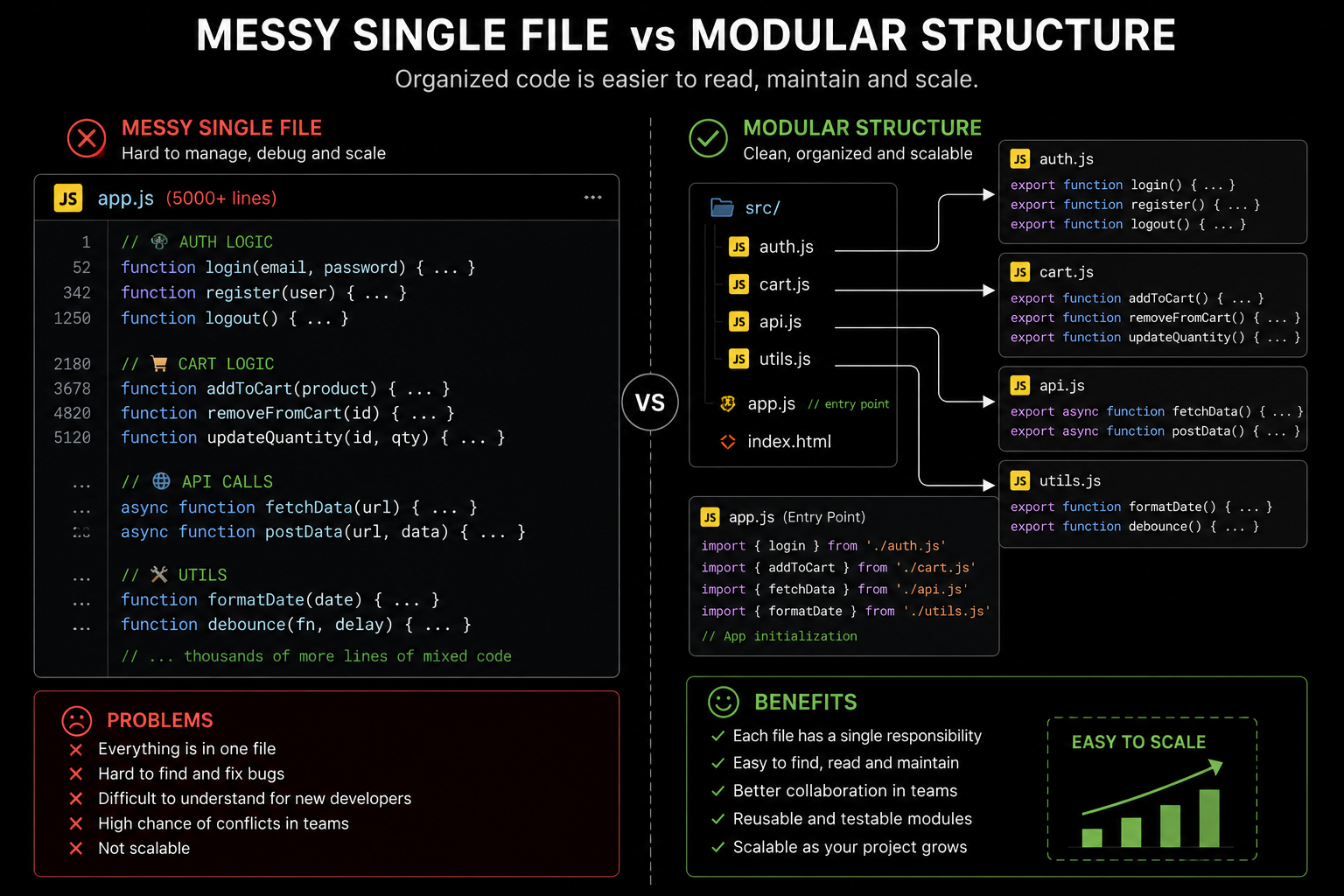
In the beginning, everything usually lives inside a single file. You write a few functions, add some event listeners, fetch data from an API, and the application works perfectly fine. The code feels manageable because the project itself is small. But then features start growing. Authentication gets added. Product filtering appears. Utility functions multiply. API calls increase. Suddenly the file becomes thousands of lines long, and finding one specific function starts feeling like searching for a charger cable inside a messy backpack.
That’s usually the moment developers realize the biggest challenge in programming is no longer writing code.
It’s organizing code.
A large unstructured JavaScript file slowly turns into mental chaos. Functions accidentally overwrite each other. Variables leak into places they shouldn’t. Debugging becomes exhausting because unrelated logic sits together in the same file. Even making small changes feels risky because one modification can unexpectedly break another feature somewhere else.
This exact problem is why JavaScript modules became one of the most important improvements in modern JavaScript development.
The Real Problem Modules Solve
Before understanding import and export, it’s important to understand the problem modules were created to solve.
Imagine building a food delivery application without modules. Everything exists inside one giant file:
Login logic
Payment handling
Restaurant rendering
Cart management
API requests
Utility functions
Notifications
all mixed together.
At first it works. Then the application grows larger, and the file slowly becomes difficult to maintain. Two developers accidentally create functions with the same name. One piece of code unexpectedly modifies another feature. Debugging takes longer because developers don’t even know where related logic exists anymore.
For example:
function showMessage() {
  console.log("Welcome User");
}
Later another developer unknowingly writes:
function showMessage() {
  console.log("Payment Successful");
}
Now the second function overwrites the first one because both exist in the same global scope.
This kind of issue becomes extremely common in larger projects.
Modules solve this by separating code into isolated files where logic stays organized and controlled.
What Exactly Is a Module?
A module is simply a JavaScript file that can share or receive code from other files.
That’s all.
Instead of placing everything inside one enormous script, developers divide applications into smaller focused files.
For example:
auth.js
cart.js
api.js
utils.js
payment.js
Each file handles one responsibility.
The authentication logic stays inside auth.js. Payment-related functionality stays inside payment.js. Utility helpers stay inside utils.js.
This separation immediately makes applications easier to understand because developers know exactly where certain logic belongs.
It’s similar to organizing tools in different drawers instead of throwing everything into one giant box. The tools are still part of the same workspace, but now finding and managing them becomes dramatically easier.
Exporting Functions or Values
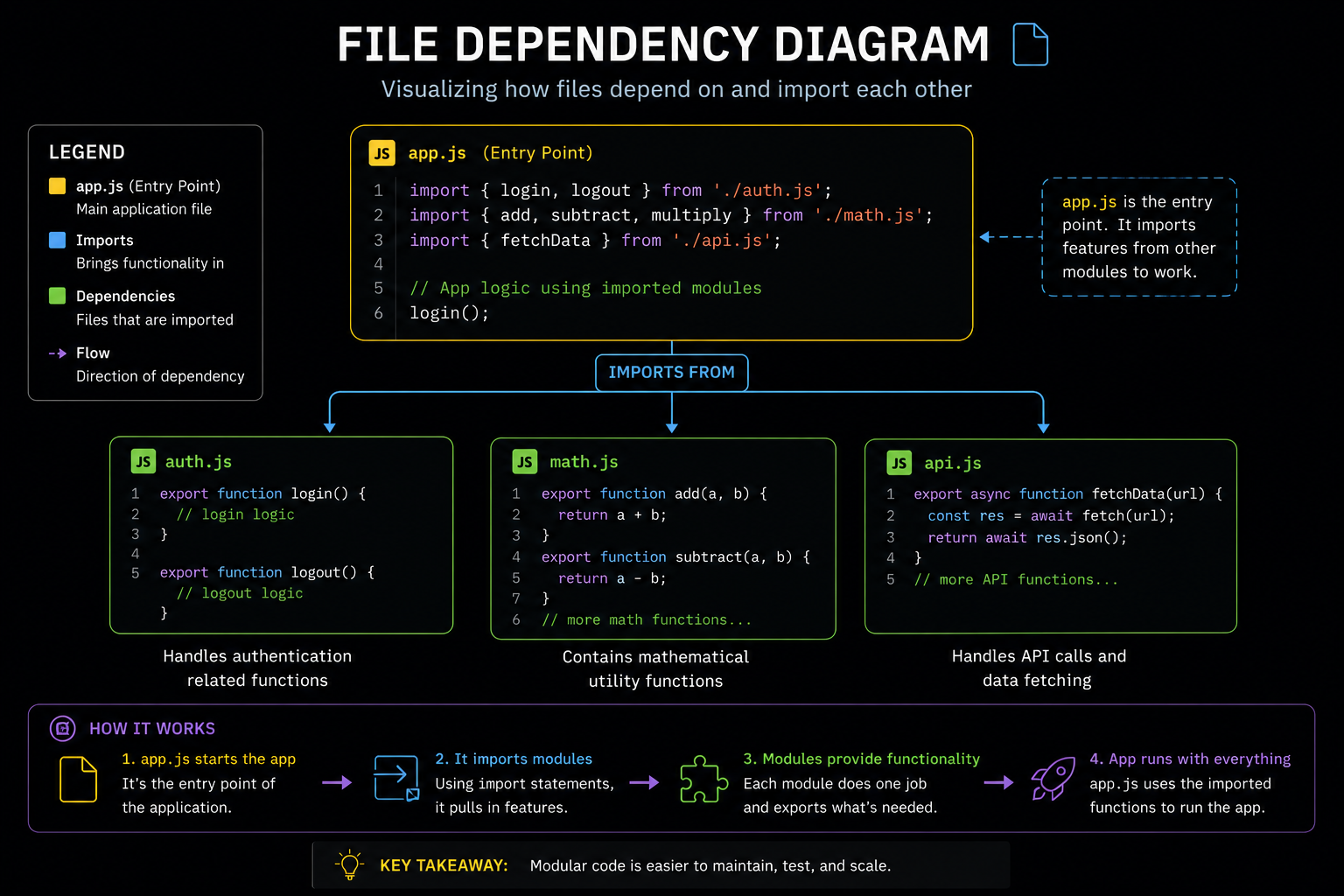
Modules become useful when they can share code with other files. That sharing process is called exporting.
Imagine you create a utility file called math.js.
function add(a, b) {
  return a + b;
}

export { add };
The export keyword makes the add function available outside the file.
Now another file can use it without rewriting the logic again.
You can export almost anything in JavaScript:
export const appName = "FoodieHub";
or:
export function calculateTotal(price, tax) {
  return price + tax;
}
or even:
export class User {
  constructor(name) {
    this.name = name;
  }
}
This controlled sharing is extremely important because modules keep unnecessary code private while exposing only what other files actually need.
That privacy prevents accidental interference between different parts of an application.
Importing Modules
Once something is exported, another file can import it.
For example:
import { add } from "./math.js";

console.log(add(2, 3));
Output:
5
Now app.js can reuse functionality from math.js cleanly.
This may seem small initially, but in real-world development this becomes incredibly powerful. Large applications often contain hundreds of files communicating with each other through imports and exports.
Think of modules like departments inside a company.
The finance department handles payments. The HR department manages employees. The marketing department handles promotions. Each department focuses on its own responsibilities while still collaborating with others when necessary.
Modules work exactly the same way inside applications.
Named Exports
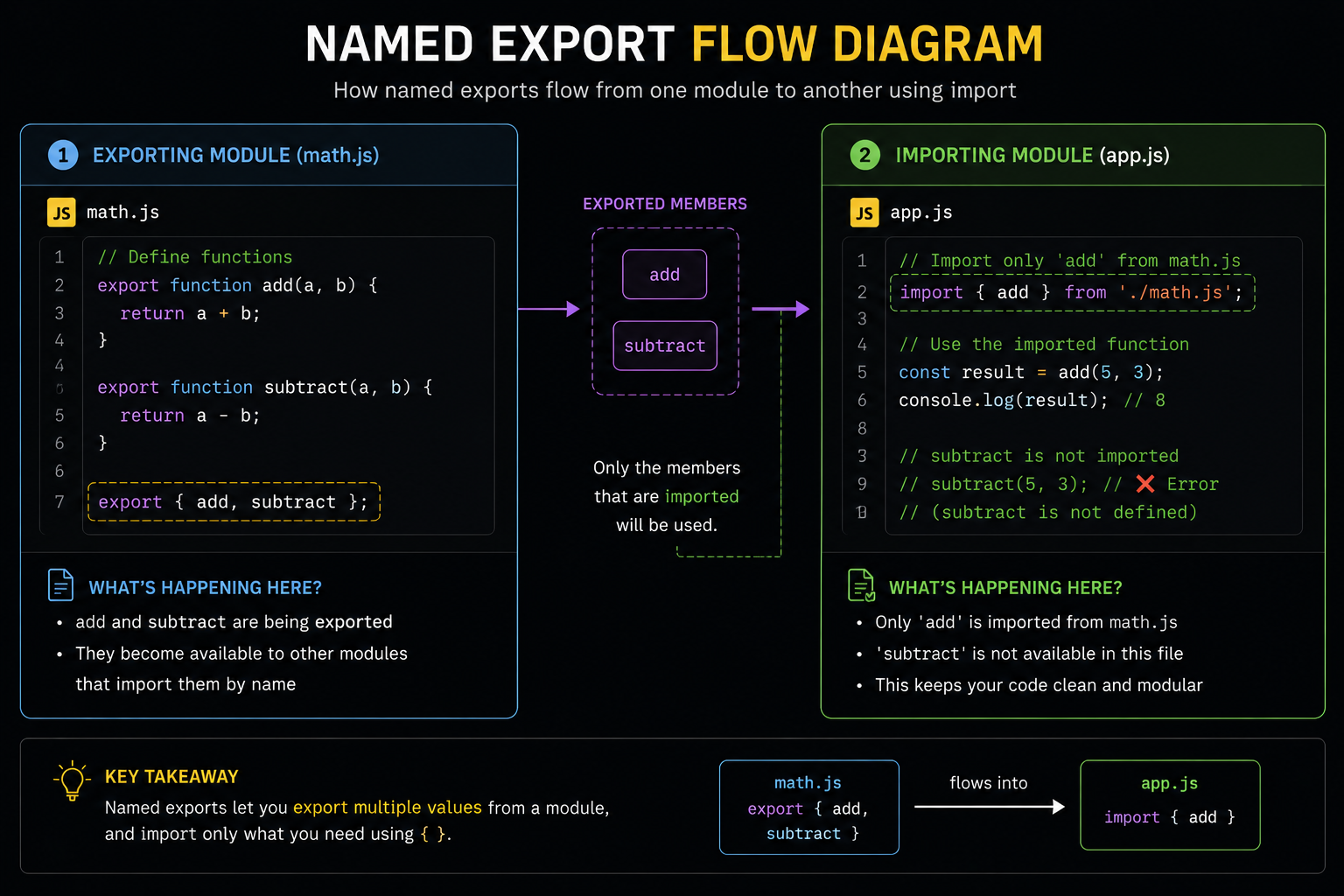
The previous example used something called a named export.
export { add };
Named exports allow multiple things to be exported from the same file.
export const add = (a, b) => a + b;

export const subtract = (a, b) => a - b;

export const multiply = (a, b) => a * b;
Now another file can selectively import only the functions it actually needs.
import { add, multiply } from "./math.js";
This improves readability because developers can clearly see what functionality is being used.
Named exports also reduce unnecessary imports, which helps keep applications cleaner and easier to maintain over time.
One thing beginners often notice is the curly braces:
import { add }
Those braces are required for named exports because JavaScript needs to know exactly which exported values should be imported.
Default Exports
Sometimes a module mainly exists for one primary thing.
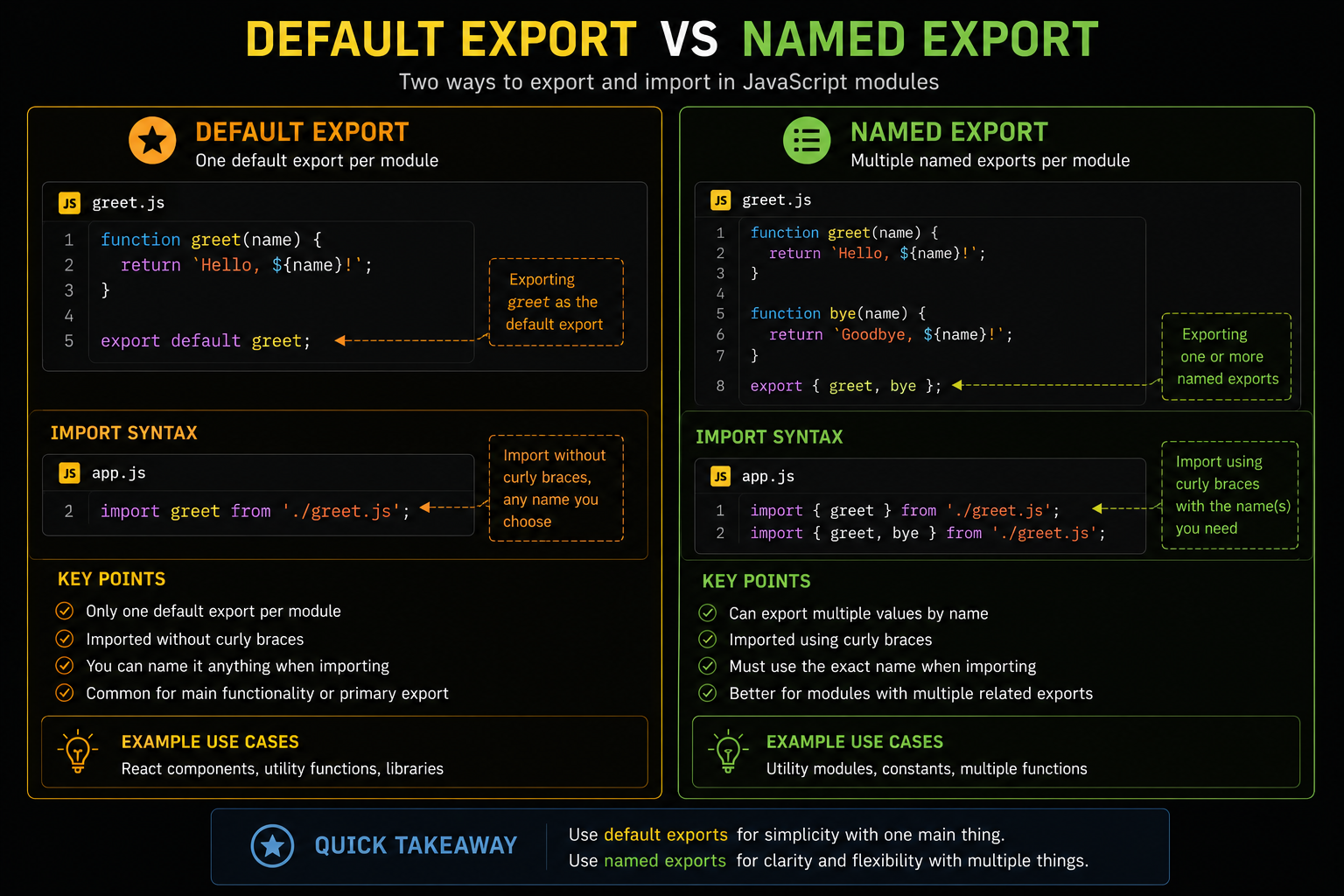
In those situations, JavaScript allows something called a default export.
export default function greet() {
  console.log("Hello");
}
Now importing becomes slightly different:
import greet from "./greet.js";
Notice there are no curly braces here.
That syntax difference confuses many beginners initially because named exports and default exports look very similar conceptually but behave differently during imports.
A simple way to remember it is:
Named exports → use curly braces
Default exports → no curly braces
Default exports are commonly used when a file mainly represents one feature, one component, or one primary functionality.
For example:
React components
Main utility functions
Configuration objects
The Confusion Most Beginners Face
One of the most common beginner mistakes is mixing default and named imports incorrectly.
For example:
export default function greet() {}
must be imported like this:
import greet from "./greet.js";
But many beginners accidentally write:
import { greet } from "./greet.js";
which causes import errors.
Another common mistake involves incorrect file paths.
Developers often write:
import { add } from "math.js";
instead of:
import { add } from "./math.js";
These mistakes are completely normal while learning modules because the syntax initially feels strict and unfamiliar. Even experienced developers occasionally make these errors during refactoring.
The important thing is understanding why the errors happen instead of blindly memorizing syntax.
How Modules Improve Real Applications
The biggest benefit of modules is not shorter code.
It’s maintainability.
Imagine debugging a 10,000-line JavaScript file where authentication logic, API calls, cart handling, and UI rendering all exist together. Even locating the correct section becomes mentally exhausting.
Now imagine the same application separated into modules:
auth.js
cart.js
payment.js
notifications.js
api.js
Suddenly everything becomes understandable.
When authentication breaks, developers inspect auth.js.
When payments fail, they inspect payment.js.
This separation dramatically improves readability, debugging speed, scalability, and collaboration between developers.
That’s why large companies rely heavily on modular architecture. Without modules, maintaining massive applications would become nearly impossible.
Modules Changed the Way JavaScript Applications Are Built
Before modules became standard, JavaScript applications often depended on large global script files loaded into browsers. As projects grew larger, managing dependencies became painful and error-prone.
Modules completely changed that workflow.
Modern frameworks like React, Next.js, Vue, and Node.js heavily rely on modular architecture because modular code is:
Easier to maintain
Easier to scale
Easier to debug
Easier to collaborate on
Easier to reuse
Once developers become comfortable with modules, building large applications starts feeling dramatically more organized.
Instead of one chaotic system, the application becomes a collection of smaller understandable pieces working together.
That shift changes the entire development experience.
Practical Debugging Mindset
When module-related bugs happen, experienced developers usually check a few specific things first:
Was the value exported correctly?
Is the import path accurate?
Is it a named export or default export?
Is the filename correct?
Is the imported value actually being used properly?
These small debugging habits solve a surprising number of real-world module errors.
Most module bugs are not complicated logic problems. They usually come from tiny syntax mismatches or incorrect assumptions about how files communicate with each other.
Learning to trace imports and exports calmly becomes an important developer skill over time.
Conclusion
JavaScript modules are not just about learning import and export syntax. They represent a completely different way of thinking about applications.
Instead of treating a project like one giant script, modular programming encourages developers to break applications into smaller focused responsibilities. That separation improves readability, debugging, scalability, collaboration, and long-term maintainability in ways that become more valuable as projects grow larger.
Most beginners initially focus only on memorizing export syntax. But the deeper lesson behind modules is architectural thinking. Good developers don’t just write code that works today. They write code that remains understandable months later when the project becomes larger, more complex, and harder to maintain.
And modules are one of the biggest reasons modern JavaScript applications remain manageable even at massive scale.